Function Declaration vs Function Expression: What's the Difference?

1. Introduction: Why Functions?
Imagine you're running a restaurant in Kolkata. A customer orders Chicken Biryani. Do you explain the recipe to the chef every single time?
"Basmati rice le lo, chicken marinate karo, masala bhanao, dum lagao..."
Of course not! You have a recipe card that the chef follows. Every time someone orders, just pull out the card and make it.
That's exactly what functions do in JavaScript.
Functions are reusable blocks of code that:
📦 Package logic into one container
🔁 Can be used multiple times
🧠 Make code organized and readable
2. What Are Functions? Kolkata Biryani Style
// Recipe card for Kolkata Chicken Biryani
function makeBiryani(rice, chicken, potato) {
    return "🍛 Kolkata Biryani with " + rice + "gm rice, " + chicken + "gm chicken, and " + potato + " potato!";
}

// Use it whenever order comes
console.log(makeBiryani(500, 250, 1));
Output:
🍛 Kolkata Biryani with 500gm rice, 250gm chicken, and 1 potato!
3. Function Declaration (The Regular Way)
This is the most common way to write functions. Like a permanent recipe card hanging in the kitchen of your Kolkata restaurant.
function makeBiryani(rice, chicken) {
    return rice + "gm rice + " + chicken + "gm chicken = Kolkata Biryani Ready!";
}
Example:
function orderBiryani(customerName) {
    return customerName + " ji, aapki biryani taiyaar hai!";
}

console.log(orderBiryani("Coder"));
Output:
Coder ji, aapki biryani taiyaar hai!
4. Function Expression (Function as a Variable)
Here, the function is stored in a variable. Like a Zomato/Swiggy order - the recipe is saved digitally and executed when needed.
let makeBiryani = function(rice, chicken) {
    return rice + "gm rice + " + chicken + "gm chicken = Kolkata Biryani Ready!";
};
Example:
let orderBiryani = function(customerName) {
    return customerName + " ji, aapki biryani taiyaar hai!";
};

console.log(orderBiryani("Coder"));
Output:
Coder ji, aapki biryani taiyaar hai!
5. Key Difference: Hoisting (Very High Level)
Hoisting = JavaScript's magic of moving declarations to the top.
Think of it like this in Kolkata:
Function Declaration = The restaurant signboard. You can see it even before you enter the restaurant.
Function Expression = The food itself. You can only eat it after it's cooked.
Function Declaration - Works Before Definition
// ✅ This works - like seeing the signboard before entering
console.log(makeBiryani(500, 250));

function makeBiryani(rice, chicken) {
    return rice + "gm rice + " + chicken + "gm chicken = Biryani Ready!";
}
Output:
500gm rice + 250gm chicken = Biryani Ready!
Function Expression - Does NOT Work Before Definition
// ❌ This fails - like trying to eat before cooking
console.log(makeBiryani(500, 250));  // Error!

let makeBiryani = function(rice, chicken) {
    return rice + "g rice + " + chicken + "g chicken = Biryani Ready!";
};
Output:
Error: Cannot access 'makeBiryani' before initialization
6. When to Use What?
Use Function Declaration When:
Permanent recipes in your restaurant:
function calculateBill(price, quantity) {
    return price * quantity;
}

console.log("Total bill: ₹", calculateBill(250, 2));
Output:
Total bill: ₹ 500
Use Function Expression When:
Special offers that change daily:
let todaySpecial = function(item) {
    return "Aaj ka special: " + item + "!";
};

console.log(todaySpecial("Chicken Biryani"));
Output:
Aaj ka special: Chicken Biryani!
7. Comparison Table
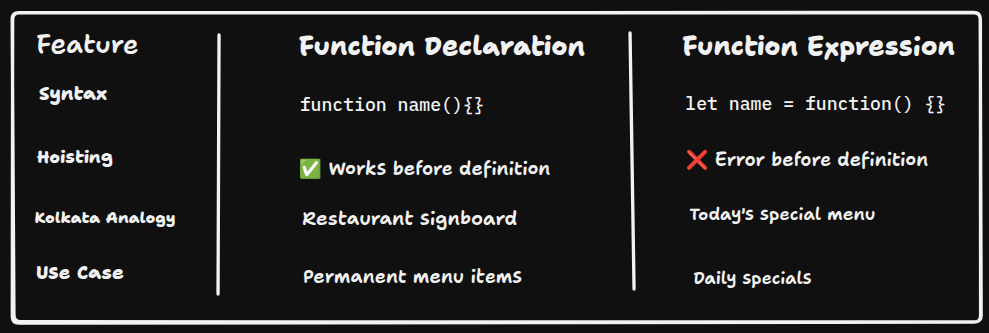
Your turn! Open console and experiment with both types. Call them before and after definition and see the hoisting magic yourself!
Happy Coding from Kolkata Restutrant! 🍛
Found this helpful? Share with your coding buddies !


